Propriedade CSS align-content
A propriedade align-content define como o navegador distribui espaço entre linhas. Veja exemplos com todos os seis valores.
A propriedade CSS align-content controla como um container flex distribui o espaço extra entre e ao redor de suas linhas ao longo do eixo transversal. Esta página explica quando a propriedade é aplicada, percorre cada valor com um exemplo executável e mostra como ela difere das propriedades de alinhamento relacionadas.
Em um container flex com direção de linha, o eixo principal é horizontal, portanto o eixo transversal é vertical. O align-content move linhas inteiras de itens para cima, para baixo ou as distribui verticalmente — ele nunca toca os itens individualmente.
Quando o align-content entra em efeito?
Duas condições devem ser verdadeiras ao mesmo tempo, caso contrário a propriedade não faz nada:
- O container deve permitir quebra de linha — defina
flex-wrap: wrap(ou use o atalhoflex-flow). O padrãonowrapmantém tudo em uma única linha. - Deve haver mais de uma linha, além de espaço livre no eixo transversal para as linhas se moverem.
Se você quiser alinhar os itens dentro de uma única linha, use align-items em vez disso. O align-content é para as linhas como um grupo; o align-items é para os itens dentro de cada linha. A propriedade align-content é uma das propriedades CSS3.
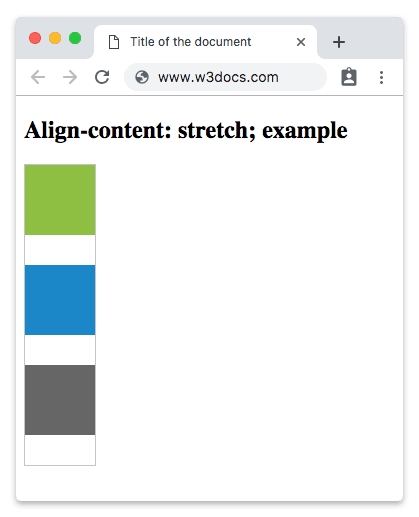
O valor stretch é o valor padrão desta propriedade.
A propriedade align-content aceita os seguintes valores:
- flex-start
- flex-end
- center
- space-between
- space-around
- space-evenly
- stretch
| Valor Inicial | stretch |
|---|---|
| Aplica-se a | Containers flex de múltiplas linhas. |
| Herdada | Não. |
| Animável | Não. |
| Versão | CSS3 |
| Sintaxe DOM | object.style.alignContent = "flex-end"; |
Sintaxe
Sintaxe da Propriedade CSS align-content
align-content: flex-start | flex-end | center | space-between | space-around | space-evenly | stretch | initial | inherit;Exemplo da propriedade align-content com o valor stretch:
<!DOCTYPE html>
<html>
  <head>
    <title>Title of the document</title>
    <style>
      #example {
        width: 70px;
        height: 300px;
        padding: 0;
        border: 1px solid #c3c3c3;
        display: flex;
        flex-flow: row wrap;
        align-content: stretch;
      }
      #example li {
        width: 70px;
        height: 70px;
        list-style: none;
      }
    </style>
  </head>
  <body>
    <h2>Align-content: stretch; example</h2>
    <ul id="example">
      <li style="background-color:#8ebf42;"></li>
      <li style="background-color:#1c87c9;"></li>
      <li style="background-color:#666;"></li>
    </ul>
  </body>
</html>Resultado
Exemplo da propriedade align-content com o valor "center":
<!DOCTYPE html>
<html>
  <head>
    <style>
      #example {
        width: 70px;
        height: 300px;
        padding: 0;
        border: 1px solid #c3c3c3;
        display: flex;
        flex-flow: row wrap;
        align-content: center;
      }
      #example li {
        width: 70px;
        height: 70px;
        list-style: none;
      }
    </style>
  </head>
  <body>
    <h2>Align-content: center; example</h2>
    <ul id="example">
      <li style="background-color:#8ebf42;"></li>
      <li style="background-color:#1c87c9;"></li>
      <li style="background-color:#666;"></li>
    </ul>
  </body>
</html>Exemplo da propriedade align-content com o valor "flex-start":
<!DOCTYPE html>
<html>
  <head>
    <style>
      #example {
        width: 70px;
        height: 300px;
        padding: 0;
        border: 1px solid #c3c3c3;
        display: flex;
        flex-flow: row wrap;
        align-content: flex-start;
      }
      #example li {
        width: 70px;
        height: 70px;
        list-style: none;
      }
    </style>
  </head>
  <body>
    <h2>Align-content: flex-start; example</h2>
    <ul id="example">
      <li style="background-color:#8ebf42;"></li>
      <li style="background-color:#1c87c9;"></li>
      <li style="background-color:#666;"></li>
    </ul>
  </body>
</html>Exemplo da propriedade align-content com o valor "flex-end":
<!DOCTYPE html>
<html>
  <head>
    <style>
      #example {
        width: 70px;
        height: 300px;
        padding: 0;
        border: 1px solid #c3c3c3;
        display: flex;
        flex-flow: row wrap;
        align-content: flex-end;
      }
      #example li {
        width: 70px;
        height: 70px;
        list-style: none;
      }
    </style>
  </head>
  <body>
    <h2>Align-content: flex-end; example</h2>
    <ul id="example">
      <li style="background-color:#8ebf42;"></li>
      <li style="background-color:#1c87c9;"></li>
      <li style="background-color:#666;"></li>
    </ul>
  </body>
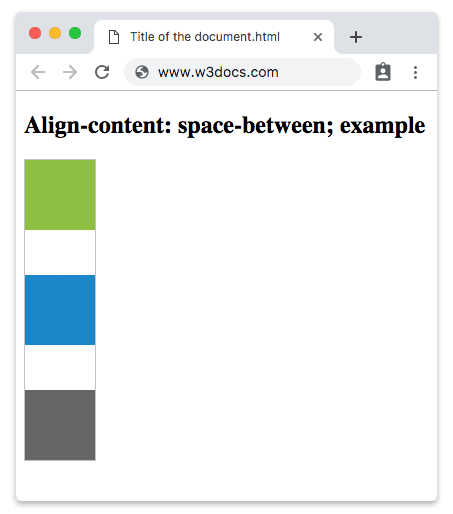
</html>No exemplo a seguir, o espaço é distribuído uniformemente entre as linhas flex.
Exemplo da propriedade align-content com o valor "space-between":
<!DOCTYPE html>
<html>
  <head>
    <style>
      #example {
        width: 70px;
        height: 300px;
        padding: 0;
        border: 1px solid #c3c3c3;
        display: flex;
        flex-flow: row wrap;
        align-content: space-between;
      }
      #example li {
        width: 70px;
        height: 70px;
        list-style: none;
      }
    </style>
  </head>
  <body>
    <h2>Align-content: space-between; example</h2>
    <ul id="example">
      <li style="background-color:#8ebf42;"></li>
      <li style="background-color:#1c87c9;"></li>
      <li style="background-color:#666;"></li>
    </ul>
  </body>
</html>Resultado
Outro exemplo com o valor "space-around". Há espaço igual entre as linhas flex.
Exemplo da propriedade align-content com o valor "space-around":
<!DOCTYPE html>
<html>
  <head>
    <style>
      #example {
        width: 70px;
        height: 300px;
        padding: 0;
        border: 1px solid #c3c3c3;
        display: flex;
        flex-flow: row wrap;
        align-content: space-around;
      }
      #example li {
        width: 70px;
        height: 70px;
        list-style: none;
      }
    </style>
  </head>
  <body>
    <h2>Align-content: space-around; example</h2>
    <ul id="example">
      <li style="background-color:#8ebf42;"></li>
      <li style="background-color:#1c87c9;"></li>
      <li style="background-color:#666;"></li>
    </ul>
  </body>
</html>Com space-evenly, os espaços antes da primeira linha, entre cada linha e após a última linha são todos idênticos — ao contrário de space-around, onde os espaços externos têm metade do tamanho dos internos.
Exemplo da propriedade align-content com o valor "space-evenly":
<!DOCTYPE html>
<html>
  <head>
    <style>
      #example {
        width: 70px;
        height: 300px;
        padding: 0;
        border: 1px solid #c3c3c3;
        display: flex;
        flex-flow: row wrap;
        align-content: space-evenly;
      }
      #example li {
        width: 70px;
        height: 70px;
        list-style: none;
      }
    </style>
  </head>
  <body>
    <h2>Align-content: space-evenly; example</h2>
    <ul id="example">
      <li style="background-color:#8ebf42;"></li>
      <li style="background-color:#1c87c9;"></li>
      <li style="background-color:#666;"></li>
    </ul>
  </body>
</html>align-content vs. align-items vs. justify-content
Essas três propriedades são fáceis de confundir porque todas alinham filhos flex:
align-content— alinha as linhas como um grupo no eixo transversal. Requer quebra de linha e múltiplas linhas.align-items— alinha os itens dentro de uma única linha no eixo transversal. Funciona mesmo com uma única linha.justify-content— alinha os itens ao longo do eixo principal (a direção em que os itens fluem).
Para um tour mais aprofundado de como esses se encaixam, veja The Ultimate Guide to Flexbox.
Suporte nos navegadores
align-content é suportado em todos os navegadores modernos — Chrome, Firefox, Safari, Edge e Opera. Faz parte da especificação estável do Flexbox, portanto não são necessários prefixos de fornecedores para as versões atuais.
Valores
| Valor | Descrição | Experimente |
|---|---|---|
| stretch | Faz os itens se esticarem para preencher o container. Este é o valor padrão desta propriedade. | Experimente » |
| center | Os itens são colocados no centro do container. | Experimente » |
| flex-start | Os itens são colocados no início do container. | Experimente » |
| flex-end | Os itens são colocados no final do container. | Experimente » |
| space-between | Distribui o espaço uniformemente entre as linhas flex. | Experimente » |
| space-around | Os itens são distribuídos com espaço igual entre eles. | Experimente » |
| space-evenly | Distribui os itens com espaço igual entre eles, assim como antes do primeiro e após o último item. | Experimente » |
| initial | Faz a propriedade usar seu valor padrão. | Experimente » |
| inherit | Herda a propriedade do elemento pai. |