Propriedade CSS overflow
A propriedade CSS overflow define como o conteúdo deve se comportar dentro da caixa. Veja os valores e exemplos da propriedade.
A propriedade CSS overflow controla o que acontece quando o conteúdo de um elemento é grande demais para caber dentro de sua caixa. Você decide se o conteúdo extra é simplesmente cortado, exibido mesmo assim ou tornado rolável.
O overflow só se torna visível quando a caixa tem um tamanho restrito. A forma mais comum de restringi-la é definir uma height fixa (e opcionalmente uma width), mas uma caixa também pode ser restringida por um layout flex ou grid. Se a caixa puder crescer livremente para acomodar seu conteúdo, não há nada para transbordar e a propriedade não tem efeito visível.
overflow é uma abreviação que define duas propriedades detalhadas ao mesmo tempo:
- overflow-x — controla o recorte no eixo esquerdo/direito (horizontal).
- overflow-y — controla o recorte no eixo superior/inferior (vertical).
Quando você define overflow com um valor, ambos os eixos recebem esse valor. Com dois valores, o primeiro se aplica a overflow-x e o segundo a overflow-y (por exemplo, overflow: hidden scroll;).
Valores em resumo
A propriedade overflow aceita as seguintes palavras-chave:
visible— o padrão. O conteúdo não é recortado; ele transborda para fora da caixa e sobrepõe o que estiver ao lado.hidden— o conteúdo que não cabe é recortado e fica invisível. Nenhuma barra de rolagem é exibida, portanto a parte oculta é inacessível ao usuário.scroll— o conteúdo é recortado e as barras de rolagem são sempre exibidas (mesmo quando tudo cabe), o que evita mudanças no layout.auto— o conteúdo é recortado e as barras de rolagem aparecem apenas quando necessário. Esta é a escolha habitual para painéis roláveis.overlay— semelhante aauto, mas as barras de rolagem são desenhadas sobre o conteúdo em vez de ocupar espaço.
O valor overlay está obsoleto e não deve ser usado. Use auto — os navegadores modernos podem desenhar barras de rolagem em estilo overlay com base nas configurações do sistema operacional do usuário.
Escolhendo um valor
- Use
autopara uma região rolável (painéis de chat, blocos de código, modais) — as barras de rolagem aparecem apenas se o conteúdo realmente transborda. - Use
hiddenpara recortar conteúdo deliberadamente, para recortar uma imagem com bordas arredondadas ou para conter floats (veja abaixo). Lembre-se de que o conteúdo recortado fica inacessível ao usuário, então não oculte nada que ele precise alcançar. - Use
scrollquando quiser uma área reservada para a barra de rolagem para que o layout não salte conforme o conteúdo muda. - Deixe como
visiblequando o overflow for aceitável, como um tooltip ou dropdown que intencionalmente se estende além de seu elemento pai.
Dois efeitos colaterais úteis
Contendo floats. Definir overflow com qualquer valor diferente de visible faz com que o elemento cresça o suficiente para envolver seus filhos flutuantes. Assim, um pai com overflow: hidden (ou auto) e sem altura declarada vai se esticar para incluir o conteúdo flutuante dentro dele. Note que isso não limpa o float — apenas o contém. (A alternativa moderna é display: flow-root, que faz a mesma coisa sem os efeitos colaterais de recorte.)
Criando um contexto de formatação de bloco (BFC). Um valor de overflow diferente de visible inicia um novo contexto de formatação de bloco. Isso é útil quando você quer que um elemento de bloco fique ordenadamente ao lado de um elemento flutuante em vez de fluir por baixo dele.
| Valor Inicial | visible |
|---|---|
| Aplica-se a | Contêineres de bloco, contêineres flex e contêineres grid. |
| Herdado | Não. |
| Animável | Não. |
| Versão | CSS2 |
| Sintaxe DOM | Object.style.overflow = "auto"; |
Sintaxe
Sintaxe CSS overflow
overflow: visible | hidden | scroll | auto | overlay | initial | inherit;Exemplo da propriedade overflow com o valor "visible"
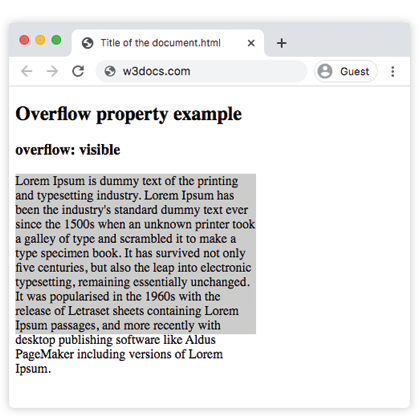
Com visible, o texto do parágrafo ultrapassa a parte inferior de sua caixa de 200px em vez de ser cortado — o comportamento padrão.
Exemplo de código CSS overflow
<!DOCTYPE html>
<html>
  <head>
    <style>
      p {
        background-color: #ccc;
        width: 300px;
        height: 200px;
        overflow: visible;
      }
    </style>
  </head>
  <body>
    <h2>Overflow property example</h2>
    <h3>overflow: visible</h3>
    <p>Lorem Ipsum is dummy text of the printing and typesetting industry. Lorem Ipsum has been the industry's standard dummy text ever since the 1500s when an unknown printer took a galley of type and scrambled it to make a type specimen book. It has survived not only five centuries, but also the leap into electronic typesetting, remaining essentially unchanged. It was popularised in the 1960s with the release of Letraset sheets containing Lorem Ipsum passages, and more recently with desktop publishing software like Aldus PageMaker including versions of Lorem Ipsum.</p>
  </body>
</html>Resultado
Exemplo da propriedade overflow com o valor "scroll"
Com scroll, ambas as barras de rolagem aparecem independentemente de serem necessárias, e o texto que transborda fica acessível ao rolar.
Exemplo CSS overflow scroll
<!DOCTYPE html>
<html>
  <head>
    <style>
      p {
        background-color: #ccc;
        width: 300px;
        height: 200px;
        overflow: scroll;
      }
    </style>
  </head>
  <body>
    <h2>Overflow property example</h2>
    <h3>overflow: scroll</h3>
    <p>Lorem Ipsum is simply dummy text of the printing and typesetting industry. Lorem Ipsum has been the industry's standard dummy text ever since the 1500s when an unknown printer took a galley of type and scrambled it to make a type specimen book. It has survived not only five centuries, but also the leap into electronic typesetting, remaining essentially unchanged. It was popularised in the 1960s with the release of Letraset sheets containing Lorem Ipsum passages, and more recently with desktop publishing software like Aldus PageMaker including versions of Lorem Ipsum.</p>
  </body>
</html>Exemplo da propriedade overflow com o valor "hidden"
Com hidden, o texto que não cabe é recortado e não há barra de rolagem, portanto a parte cortada não pode ser acessada.
Exemplo CSS overflow hidden
<!DOCTYPE html>
<html>
  <head>
    <style>
      p {
        background-color: #ccc;
        width: 300px;
        height: 200px;
        overflow: hidden;
      }
    </style>
  </head>
  <body>
    <h2>Overflow property example</h2>
    <h3>overflow: hidden</h3>
    <p>Lorem Ipsum is dummy text of the printing and typesetting industry. Lorem Ipsum has been the industry's standard dummy text ever since the 1500s when an unknown printer took a galley of type and scrambled it to make a type specimen book. It has survived not only five centuries, but also the leap into electronic typesetting, remaining essentially unchanged. It was popularised in the 1960s with the release of Letraset sheets containing Lorem Ipsum passages, and more recently with desktop publishing software like Aldus PageMaker including versions of Lorem Ipsum.</p>
  </body>
</html>Exemplo da propriedade overflow com o valor "auto"
auto é o valor mais prático: uma barra de rolagem aparece apenas no eixo que realmente transborda. Este exemplo também mostra como overflow-x e overflow-y podem ser definidos de forma independente.
CSS overflow auto
<!DOCTYPE html>
<html>
  <head>
    <title>Title of the document</title>
    <style>
      .scroll {
        width: 200px;
        height: 300px;
        border: 1px solid;
        overflow: auto;
        margin-bottom: 10px;
      }
      .scroll-x {
        width: 200px;
        height: 300px;
        border: 1px solid;
        overflow-x: auto;
        overflow-y: hidden;
        margin-bottom: 10px;
      }
      .scroll-y {
        width: 200px;
        height: 300px;
        border: 1px solid;
        overflow-y: auto;
        margin-bottom: 10px;
      }
      .scroll>div {
        width: 400px;
        height: 50px;
        background: #ccc;
      }
      .scroll-y>div {
        width: 200px;
        height: 50px;
        background: #ccc;
      }
      .scroll-x>div {
        width: 400px;
        height: 50px;
        background: #ccc;
        overflow: hidden;
      }
    </style>
  </head>
  <body>
    <h1>Example with Overflow Property</h1>
    <h2>overflow overflow scroll auto</h2>
    <div class="scroll">
      <h2>Overflow Property </h2>
      <div>
        <h2>overflow scroll property</h2>
      </div>
      <p>
        Lorem Ipsum is dummy text of the printing and typesetting industry. Lorem Ipsum has been the industry's standard dummy text ever since the 1500s when an unknown printer took a galley of type and scrambled it to make a type specimen book. It has survived not only five centuries, but also the leap into electronic typesetting, remaining essentially unchanged. It was popularised in the 1960s with the release of Letraset sheets containing Lorem Ipsum passages, and more recently with desktop publishing software like Aldus PageMaker including versions of Lorem Ipsum.
      </p>
    </div>
    <h2>overflow overflow-x auto</h2>
    <div class="scroll-x">
      <h2>Overflow Property </h2>
      <div>
        <h2>overflow scroll-x property</h2>
      </div>
      <p>
        Lorem Ipsum is dummy text of the printing and typesetting industry. Lorem Ipsum has been the industry's standard dummy text ever since the 1500s when an unknown printer.
      </p>
    </div>
    <h2>overflow overflow-y auto</h2>
    <div class="scroll-y">
      <h2>Overflow Property </h2>
      <div>
        <h2>overflow scroll-y property</h2>
      </div>
      <p>
        Lorem Ipsum is dummy text of the printing and typesetting industry. Lorem Ipsum has been the industry's standard dummy text ever since the 1500s when an unknown printer took a galley of type and scrambled it to make a type specimen book. software like Aldus PageMaker including versions of Lorem Ipsum.but also the leap into electronic typesetting, remaining essentially unchanged. It was popularised in the 1960s with the release of Letraset sheets containing Lorem Ipsum passages, and more recently with desktop publishing software like Aldus PageMaker including versions of Lorem Ipsum.
      </p>
    </div>
  </body>
</html>Exemplo da propriedade overflow com todos os valores
Este exemplo coloca o mesmo texto em cinco caixas para que você possa comparar cada valor lado a lado.
Exemplo CSS overflow com todos os valores
<!DOCTYPE html>
<html>
  <head>
    <title>Title of the document</title>
    <style>
      div.scroll {
        background-color: #eee;
        width: 300px;
        height: 200px;
        overflow: scroll;
      }
      div.hidden {
        background-color: #eee;
        width: 300px;
        height: 200px;
        overflow: hidden;
      }
      div.auto {
        background-color: #eee;
        width: 300px;
        height: 200px;
        overflow: auto;
      }
      div.visible {
        background-color: #eee;
        width: 300px;
        height: 200px;
        overflow: visible;
      }
      div.overlay {
        background-color: #eee;
        width: 300px;
        height: 200px;
        overflow: overlay;
      }
    </style>
  </head>
  <body>
    <h2>Overflow property example</h2>
    <h3>overflow: scroll</h3>
    <div class="scroll">
      Lorem Ipsum is dummy text of the printing and typesetting industry. Lorem Ipsum has been the industry's standard dummy text ever since the 1 500s when an unknown printer took a galley of type and scrambled it to make a type specimen book. It has survived not only five centuries, but also the leap into electronic typesetting, remaining essentially unchanged. It was popularised in the 1960s with the release of Letraset sheets containing Lorem Ipsum passages, and more recently with desktop publishing software like Aldus PageMaker including versions of Lorem Ipsum.
    </div>
    <h3>overflow: hidden</h3>
    <div class="hidden">
      Lorem Ipsum is the dummying text of the printing and typesetting industry. Lorem Ipsum has been the industry's standard dummy text ever since the 1500s when an unknown printer took a galley of type and scrambled it to make a type specimen book. It has survived not only five centuries, but also the leap into electronic typesetting, remaining essentially unchanged. It was popularised in the 1960s with the release of Letraset sheets containing Lorem Ipsum passages, and more recently with desktop publishing software like Aldus PageMaker including versions of Lorem Ipsum.
    </div>
    <h3>overflow: auto</h3>
    <div class="auto">
      Lorem Ipsum is the dummying text of the printing and typesetting industry. Lorem Ipsum has been the industry's standard dummy text ever since the 1500s when an unknown printer took a galley of type and scrambled it to make a type specimen book. It has survived not only five centuries, but also the leap into electronic typesetting, remaining essentially unchanged. It was popularised in the 1960s with the release of Letraset sheets containing Lorem Ipsum passages, and more recently with desktop publishing software like Aldus PageMaker including versions of Lorem Ipsum.
    </div>
    <h3>overflow: visible</h3>
    <div class="visible">
      Lorem Ipsum is the dummying text of the printing and typesetting industry. Lorem Ipsum has been the industry's standard dummy text ever since the 1500s when an unknown printer took a galley of type and scrambled it to make a type specimen book. It has survived not only five centuries, but also the leap into electronic typesetting, remaining essentially unchanged. It was popularised in the 1960s with the release of Letraset sheets containing Lorem Ipsum passages, and more recently with desktop publishing software like Aldus PageMaker including versions of Lorem Ipsum.
    </div>
    <br />
    <br />
    <h3>overflow: overlay</h3>
    <div class="overlay">
      Lorem Ipsum is the dummying text of the printing and typesetting industry. Lorem Ipsum has been the industry's standard dummy text ever since the 1500s when an unknown printer took a galley of type and scrambled it to make a type specimen book. It has survived not only five centuries, but also the leap into electronic typesetting, remaining essentially unchanged. It was popularised in the 1960s with the release of Letraset sheets containing Lorem Ipsum passages, and more recently with desktop publishing software like Aldus PageMaker including versions of Lorem Ipsum.
    </div>
  </body>
</html>Valores
| Valor | Descrição | Experimente |
|---|---|---|
| visible | O conteúdo não é recortado e é renderizado fora da caixa de padding. Este é o valor padrão desta propriedade. | Experimente » |
| hidden | O conteúdo é recortado para caber na caixa de padding. | Experimente » |
| scroll | A barra de rolagem é adicionada para ver o restante do conteúdo. | Experimente » |
| auto | Depende do navegador. Se o conteúdo transbordar, a barra de rolagem é adicionada. | Experimente » |
| overlay | Funciona da mesma forma que auto, mas com as barras de rolagem desenhadas sobre o conteúdo em vez de ocupar espaço. Este valor obsoleto não deve mais ser usado, embora ainda possa funcionar. | Experimente » |
| initial | Faz a propriedade usar seu valor padrão. | Experimente » |
| inherit | Herda a propriedade de seu elemento pai. |
Propriedades relacionadas
- overflow-x e overflow-y — definem o recorte por eixo.
- white-space — combine
nowrapcomoverflow: hiddenpara manter o texto em uma linha antes de recortá-lo. - display —
display: flow-rootcontém floats sem os efeitos colaterais de recorte dooverflow.