Propriedade CSS text-align-last
Use a propriedade CSS text-align-last para definir o alinhamento da última linha do texto. Veja valores e exemplos práticos.
A propriedade CSS text-align-last define o alinhamento da última linha de um bloco de texto — e somente da última linha. Ela faz parte das propriedades CSS3 e funciona em conjunto com a propriedade text-align.
Quando você justifica um parágrafo com text-align: justify, todas as linhas são esticadas para preencher a largura total — exceto a última, que por padrão fica curta e alinhada ao início. text-align-last é a propriedade que decide o que acontece com essa linha final "irregular".
A propriedade age sobre a última linha formatada do contêiner de bloco ao qual é aplicada. Por exemplo, se um <div> contém um longo texto com quebras de linha, text-align-last estiliza apenas a linha no fundo — as palavras restantes que não preencheram uma linha completa.
Esta propriedade é mais perceptível quando text-align: justify é usado e o texto ocupa várias linhas. Em uma única linha de texto, a última linha é a única linha, portanto o comportamento é idêntico ao de text-align.
Quando usar
Use text-align-last quando o texto justificado deixa uma linha final estranha e você deseja mais controle sobre ela:
justify— força a última linha a se expandir por toda a largura também, fazendo o parágrafo formar um bloco retangular limpo (comum em layouts no estilo impresso e cartazes).center— dá a um bloco justificado uma linha de fechamento centralizada, frequentemente usada em títulos curtos ou citações em destaque.right/end— empurra a última linha para a borda oposta, criando um visual deliberadamente assimétrico.
Como a propriedade é herdada, defini-la uma vez num contêiner aplica-a a todos os contêineres de bloco internos, a menos que um filho a substitua.
| Valor Inicial | auto |
|---|---|
| Aplicável a | Contêineres de bloco. |
| Herdada | Sim. |
| Animável | Não. |
| Versão | CSS3 |
| Sintaxe DOM | object.style.textAlignLast = "left"; |
Compatibilidade com Navegadores
| Navegador | Suporte |
|---|---|
| Chrome | 50+ |
| Edge | 12+ |
| Firefox | 49+ |
| Safari | 10.1+ |
| Opera | 37+ |
Sintaxe
Sintaxe CSS de text-align-last
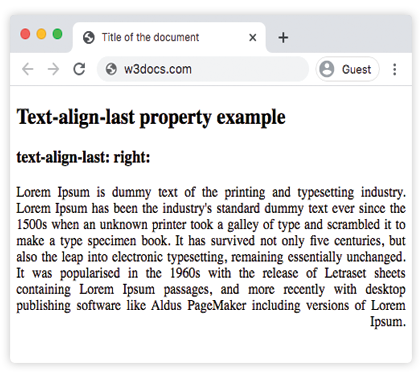
text-align-last: auto | left | right | center | justify | start | end | initial | inherit;Exemplo da propriedade text-align-last:
Exemplo de código CSS text-align-last
<!DOCTYPE html>
<html>
  <head>
    <title>Title of the document</title>
    <style>
      .demo {
        text-align: justify;
        text-align-last: right;
      }
    </style>
  </head>
  <body>
    <h2>Text-align-last property example</h2>
    <h3>text-align-last: right:</h3>
    <div class="demo">
      Lorem Ipsum is dummy text of the printing and typesetting industry. Lorem Ipsum has been the industry's standard dummy text ever since the 1500s when an unknown printer took a galley of type and scrambled it to make a type specimen book. It has survived not only five centuries, but also the leap into electronic typesetting, remaining essentially unchanged. It was popularised in the 1960s with the release of Letraset sheets containing Lorem Ipsum passages, and more recently with desktop publishing software like Aldus PageMaker including versions of Lorem Ipsum.
    </div>
  </body>
</html>Resultado
Exemplo da propriedade text-align-last com os valores "start", "justify" e "center":
Exemplo com todos os valores de CSS text-align-last
<!DOCTYPE html>
<html>
  <head>
    <title>Title of the document</title>
    <style>
      .demo1 {
        text-align: justify;
        text-align-last: start;
      }
      .demo2 {
        text-align: justify;
        text-align-last: center;
      }
      .demo3 {
        text-align: justify;
        text-align-last: justify;
      }
    </style>
  </head>
  <body>
    <h2>Text-align-last property example</h2>
    <h3>Text-align-last: start:</h3>
    <div class="demo1">
      Lorem Ipsum is dummy text of the printing and typesetting industry. Lorem Ipsum has been the industry's standard dummy text ever since the 1500s when an unknown printer took a galley of type and scrambled it to make a type specimen book. It has survived not only five centuries, but also the leap into electronic typesetting, remaining essentially unchanged. It was popularised in the 1960s with the release of Letraset sheets containing Lorem Ipsum passages, and more recently with desktop publishing software like Aldus PageMaker including versions of Lorem Ipsum.
    </div>
    <h3>Text-align-last: center:</h3>
    <div class="demo2">
      Lorem Ipsum is dummy text of the printing and typesetting industry. Lorem Ipsum has been the industry's standard dummy text ever since the 1500s when an unknown printer took a galley of type and scrambled it to make a type specimen book. It has survived not only five centuries, but also the leap into electronic typesetting, remaining essentially unchanged. It was popularised in the 1960s with the release of Letraset sheets containing Lorem Ipsum passages, and more recently with desktop publishing software like Aldus PageMaker including versions of Lorem Ipsum.
    </div>
    <h3>Text-align-last: justify:</h3>
    <div class="demo3">
      Lorem Ipsum is dummy text of the printing and typesetting industry. Lorem Ipsum has been the industry's standard dummy text ever since the 1500s when an unknown printer took a galley of type and scrambled it to make a type specimen book. It has survived not only five centuries, but also the leap into electronic typesetting, remaining essentially unchanged. It was popularised in the 1960s with the release of Letraset sheets containing Lorem Ipsum passages, and more recently with desktop publishing software like Aldus PageMaker including versions of Lorem Ipsum.
    </div>
  </body>
</html>Exemplo da propriedade text-align-last com o valor "end":
Observe que text-align-last é aplicado ao <div> que envolve o conteúdo, mas cada <p> interno é seu próprio contêiner de bloco — portanto o alinhamento end afeta a última linha de cada parágrafo, não apenas o último parágrafo do grupo.
<!DOCTYPE html>
<html>
  <head>
    <title>Title of the document</title>
    <style>
      .demo {
        text-align: justify;
        text-align-last: end;
      }
    </style>
  </head>
  <body>
    <h2>Text-align-last property example</h2>
    <h3>text-align-last: end:</h3>
    <div class="demo">
      <p>
        Lorem Ipsum is dummy text of the printing and typesetting industry. Lorem Ipsum has been the industry's standard dummy text ever since the 1500s when an unknown printer took a galley of type and scrambled it to make a type specimen book. It has survived not only five centuries, but also the leap into electronic typesetting, remaining essentially unchanged. It was popularised in the 1960s with the release of Letraset sheets containing Lorem Ipsum passages, and more recently with desktop publishing software like Aldus PageMaker including versions of Lorem Ipsum.
      </p>
      <p>
        Lorem Ipsum is dummy text of the printing and typesetting industry. Lorem Ipsum has been the industry's standard dummy text ever since the 1500s when an unknown printer took a galley of type and scrambled it to make a type specimen book. It has survived not only five centuries, but also the leap into electronic typesetting, remaining essentially unchanged.
      </p>
      <p>
        Lorem Ipsum is dummy text of the printing and typesetting industry. Lorem Ipsum has been the industry's standard dummy text ever since the 1500s when an unknown printer took a galley of type and scrambled it to make a type specimen book.
      </p>
    </div>
  </body>
</html>Valores
| Valor | Descrição |
|---|---|
| auto | Usa o valor da propriedade text-align. Este é o valor padrão. |
| left | Alinha a última linha à esquerda. |
| right | Alinha a última linha à direita. |
| center | Alinha a última linha ao centro. |
| justify | A última linha é justificada como as demais linhas. |
| start | A última linha é alinhada no início da linha. À esquerda se a direção for da esquerda para a direita e à direita se for da direita para a esquerda. |
| end | A última linha é alinhada no fim da linha. À direita se a direção for da esquerda para a direita e à esquerda se for da direita para a esquerda. |
| initial | Faz a propriedade usar seu valor padrão. |
| inherit | Herda a propriedade do elemento pai. |
Prática
Propriedades relacionadas
text-align— alinha todas as linhas de um bloco de texto.text-justify— controla como o espaço é distribuído quando o texto é justificado.direction— define a direção do texto, o que determina o significado destarteend.