CSS :first-child Pseudo Classe
A pseudo-classe :first-child do CSS estiliza o primeiro filho do seu pai. Aprenda a sintaxe, os detalhes e exemplos executáveis.
A pseudo-classe CSS :first-child corresponde a um elemento que é o primeiro filho do seu pai. É mais frequentemente usada para estilizar o primeiro item de uma lista, o primeiro parágrafo de uma seção, ou para remover a margem/borda superior do primeiro elemento em um grupo.
Esta página aborda a sintaxe, a regra que confunde a maioria das pessoas, vários exemplos executáveis e como :first-child difere dos seus seletores relacionados.
O detalhe importante: "primeiro filho" não é "primeiro desse tipo"
Um seletor como p:first-child não significa "o primeiro <p> dentro do pai." Significa "um <p> que também é o primeiro filho do seu pai." Se um elemento diferente vier antes do parágrafo, a regra não corresponde a nada.
<div>
<h2>Heading</h2>
<p>This paragraph is NOT styled — the <h2> is the first child.</p>
</div>
<div>
<p>This paragraph IS styled — it is the first child of its <div>.</p>
</div>Portanto, p:first-child é lido da direita para a esquerda como: selecionar <p>, mas apenas quando esse <p> for o primeiro filho do seu pai. Quando você quiser "o primeiro parágrafo independentemente do que o precede", use :first-of-type.
:first-child vs. seletores relacionados
| Seletor | Corresponde a |
|---|---|
:first-child | Um elemento que é o primeiro filho do seu pai |
:last-child | Um elemento que é o último filho do seu pai |
:first-of-type | O primeiro elemento do seu tipo entre seus irmãos |
:only-child | Um elemento que é o único filho do seu pai |
:nth-child(n) | O n-ésimo filho, por qualquer fórmula (2n, 3n+1, etc.) |
:first-child é equivalente a :nth-child(1). A principal diferença em relação a :first-of-type está na condição: :first-child corresponde apenas se o elemento for o primeiro filho do seu pai, enquanto :first-of-type corresponde ao primeiro elemento do seu tipo específico entre seus irmãos — independentemente do que vem antes.
Versão
Sintaxe
Exemplo de sintaxe CSS :first-child
:first-child {
  css declarations;
}Exemplos
Com a tag <p>
Aqui o primeiro <p> é o primeiro filho de <body>, portanto é estilizado. O segundo <p> vem após um <h2>, então não é estilizado.
Exemplo de código CSS :first-child
<!DOCTYPE html>
<html>
  <head>
    <title>Title of the document</title>
    <style>
      p:first-child {
        background-color: #1c87c9;
        color: #fff;
      }
    </style>
  </head>
  <body>
    <p>Lorem ipsum is simply dummy text...</p>
    <h2>First-child selector example</h2>
    <p>Lorem Ipsum is simply dummy text...</p>
  </body>
</html>Com a tag <li>
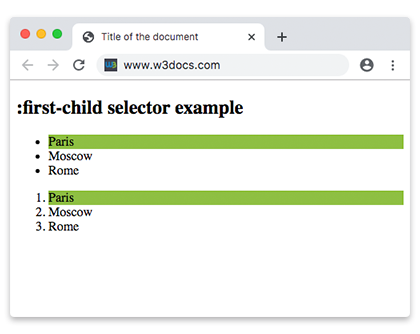
li:first-child destaca o primeiro item em cada lista. Como tanto o <ul> quanto o <ol> reiniciam a contagem de filhos, o primeiro <li> de cada um recebe o fundo colorido.
Outro exemplo de código CSS :first-child
<!DOCTYPE html>
<html>
  <head>
    <title>Title of the document</title>
    <style>
      li:first-child {
        background: #8ebf42;
      }
    </style>
  </head>
  <body>
    <h2>:first-child selector example</h2>
    <ul>
      <li>Paris</li>
      <li>Moscow</li>
      <li>Rome</li>
    </ul>
    <ol>
      <li>Paris</li>
      <li>Moscow</li>
      <li>Rome</li>
    </ol>
  </body>
</html>Com a tag <ol>
Dois elementos <ol> estão lado a lado em <body>. Apenas o primeiro é o primeiro filho de <body>, então apenas ele recebe o fundo colorido.
Exemplo do seletor :first-child com a tag HTML ol
<!DOCTYPE html>
<html>
  <head>
    <title>Title of the document</title>
    <style>
      ol:first-child {
        background: #8ebf42;
      }
    </style>
  </head>
  <body>
    <ol>
      <li>London</li>
      <li>Paris</li>
      <li>Rome</li>
    </ol>
    <ol>
      <li>London</li>
      <li>Paris</li>
      <li>Rome</li>
    </ol>
  </body>
</html>Com a tag <em>
p em:first-child seleciona um <em> apenas quando é o primeiro filho de um <p>. Em cada parágrafo abaixo, o primeiro <em> vem após as palavras "Here is a", portanto não é o primeiro filho — a regra não corresponde a nada. Esta é uma ilustração deliberada do detalhe mencionado acima.
Exemplo do seletor :first-child com a tag HTML em
<!DOCTYPE html>
<html>
  <head>
    <title>Title of the document</title>
    <style>
      p em:first-child {
        background: #82b534;
      }
    </style>
  </head>
  <body>
    <h2>:first-child selector example</h2>
    <article>
      <p>Here is a <em>some</em> text. This is a <em>example</em>.</p>
      <p>Here is a <em>some</em> text. This is a <em>example</em>.</p>
      <p>Here is a <em>some</em> text. This is a <em>example</em>.</p>
    </article>
  </body>
</html>Com a tag <ul>
:first-child funciona em todos os níveis de aninhamento. O primeiro item da lista externa e o primeiro item da lista aninhada correspondem a ul li:first-child.
Exemplo do seletor :first-child com a tag HTML ul
<!DOCTYPE html>
<html>
  <head>
    <title>Title of the document</title>
    <style>
      ul li {
        color: blue;
      }
      ul li:first-child {
        color: #8ebf42;
        font-weight: bold;
      }
    </style>
  </head>
  <body>
    <h2>:first-child selector example</h2>
    <ul>
      <li>List Item 1</li>
      <li>List Item 2</li>
      <li>
        List Item 3
        <ul>
          <li>List Item 3.1</li>
          <li>List Item 3.2</li>
          <li>List Item 3.3</li>
        </ul>
      </li>
    </ul>
  </body>
</html>Suporte de navegadores
:first-child é suportado em todos os navegadores modernos e funciona no Internet Explorer 9 e versões posteriores. Faz parte do CSS Level 2 e permaneceu inalterado no Selectors Level 3 e Level 4, portanto pode ser usado sem nenhum prefixo de fornecedor.
Seletores relacionados
:last-child— estiliza o último elemento em um grupo:first-of-type— o primeiro elemento de um determinado tipo, independentemente do que o precede:only-child— corresponde a um elemento que não tem irmãos:nth-child()— corresponde por posição com uma fórmula (:first-childequivale a:nth-child(1))