CSS :disabled Pseudo Class
Use a pseudo-classe CSS :disabled para selecionar e estilizar elementos desativados. Leia sobre a pseudo-classe e pratique com exemplos.
A pseudo-classe :disabled seleciona e estiliza todo elemento que está atualmente desativado — ou seja, um elemento com o qual o usuário não pode interagir. Um controle fica desativado quando possui o atributo HTML disabled, portanto :disabled permite dar a esses controles uma aparência distinta de "você não pode usar isso" sem precisar adicionar uma classe extra.

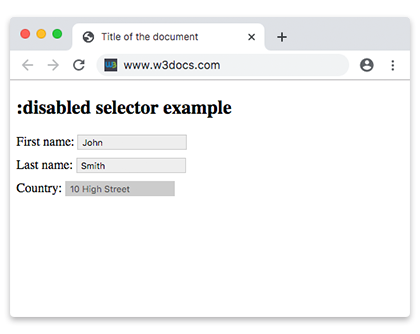
Esta página aborda o que é considerado um elemento desativado, a sintaxe do seletor, como :disabled se relaciona com seu oposto :enabled, a diferença entre disabled e readonly, e um conjunto de exemplos de estilização executáveis.
Quais elementos podem ser desativados
Apenas elementos que podem ser desativados são correspondidos por :disabled. Estes são os controles de formulário interativos:
<button><input>(todos os tipos)<select>e seus<option>/<optgroup><textarea><fieldset>— desativar um<fieldset>desativa todos os controles dentro dele
Um controle desativado se comporta de forma diferente de um normal:
- Ele não aceita cliques, entrada de texto ou foco pelo teclado.
- Seu valor não é enviado com o formulário.
- Ele não é validado pelo navegador, portanto
:valid/:invalidnão se aplicam a ele.
Elementos de texto simples como <p> ou <div> não podem ser desativados, portanto nunca correspondem a :disabled.
:disabled vs. :enabled
:disabled e :enabled são imagens espelhadas. Qualquer controle que possa ser desativado é correspondido por exatamente um deles por vez: :enabled quando está interativo, :disabled quando o atributo disabled está presente. Estilizar ambos fornece ao usuário um contraste visual claro entre controles utilizáveis e inutilizáveis.
disabled vs. readonly
Esses dois atributos parecem semelhantes, mas não são iguais:
disabled | readonly | |
|---|---|---|
| O usuário pode focar nele | Não | Sim |
| O usuário pode editar o valor | Não | Não |
| Valor enviado com o formulário | Não | Sim |
| Correspondido por | :disabled | :read-only |
Use disabled para desativar um controle completamente; use readonly (veja :read-only) quando o valor deve permanecer visível e ser enviado, mas não editado.
Sintaxe
Usado por si só, :disabled tem como alvo qualquer controle desativado. Combine-o com um seletor de tipo ou atributo para ser mais específico:
/* every disabled control */
:disabled {
  /* css declarations */
}

/* only disabled text inputs */
input[type="text"]:disabled {
  background: #ccc;
  cursor: not-allowed;
}Exemplo de definição de cor de fundo para um elemento <input> desativado:
CSS :disabled code example
<!DOCTYPE html>
<html>
  <head>
    <title>Title of the document</title>
    <style>
      input {
        padding: 2px 5px;
        margin-bottom: 10px;
        border: 1px solid #ccc;
      }
      input[type=text]:enabled {
        background: #eee;
      }
      input[type=text]:disabled {
        background: #ccc;
      }
    </style>
  </head>
  <body>
    <h2>:disabled selector example for input</h2>
    <form action="">
      <label for="name">First name:</label>
      <input type="text" value="John" id="name" />
      <br />
      <label for="lastname">Last name:</label>
      <input type="text" value="Smith" id="lastname" />
      <br />
      <label for="country">Country:</label>
      <input type="text" disabled="disabled" value="10 High Street" id="country" />
    </form>
  </body>
</html>Exemplo de definição de cor de fundo para elementos <option> desativados:
CSS :disabled another code example
<!DOCTYPE html>
<html>
  <head>
    <title>Title of the document</title>
    <style>
      option:disabled {
        background: #8ebf42;
      }
    </style>
  </head>
  <body>
    <h2>:disabled selector example for option</h2>
    <select>
      <option value="paris">Paris</option>
      <option value="london" disabled>London</option>
      <option value="moscow">Moscow</option>
      <option value="rome" disabled>Rome</option>
      <option value="berlin">Berlin</option>
    </select>
  </body>
</html>Nota: A pseudo-classe
:disabledtem precedência sobre:valide:invalid. Elementos de formulário desativados não são validados pelo navegador.
Exemplo de um elemento <input> desativado:
Example of disabled input element
<!DOCTYPE html>
<html>
  <head>
    <title>Title of the document</title>
    <style>
      input {
        width: 60%;
        margin: 0;
        border: none;
        outline: 1px solid lightgrey;
        outline-offset: 2px;
      }
      input:disabled {
        background: #cccccc;
        cursor: not-allowed;
      }
      form {
        background: #67a6ec;
        padding: 1.5em;
        max-width: 400px;
        width: 100%;
        outline: 10px solid rgba(17, 58, 103, 0.6);
      }
      hr {
        visibility: hidden;
      }
      label {
        margin-right: 3%;
        text-align: left;
        display: inline-block;
        width: 35%;
      }
    </style>
  </head>
  <body>
    <h2>:disabled selector example with styling</h2>
    <form action="#">
      <label for="name">Enabled Input:</label>
      <input type="text" autofocus />
      <hr />
      <label for="name">Disabled Input:</label>
      <input type="text" disabled />
    </form>
  </body>
</html>Nota de acessibilidade
Como um controle desativado não pode receber foco, usuários de teclado e leitores de tela simplesmente o ignoram e não recebem nenhuma explicação do motivo pelo qual ele está indisponível. Não confie apenas em deixá-lo acinzentado — quando o motivo importa, adicione texto de ajuda próximo, ou mantenha o controle ativo e valide ao enviar o formulário. Mantenha também contraste suficiente no texto desativado para que permaneça legível.
Pseudo-classes relacionadas
:enabled— o estado oposto: controles com os quais o usuário pode interagir.:read-onlye:read-write— para entradasreadonly.:required— controles que devem ser preenchidos.:valide:invalid— estados de validação de formulário.:checked— checkboxes, radios e opções selecionados.:focus— o elemento que atualmente tem o foco do teclado.