Propriedade CSS column-rule-color
A propriedade CSS column-rule-color define a cor da linha divisória entre colunas. Veja exemplos e defina suas próprias cores.
A propriedade CSS column-rule-color define a cor da linha divisória (a linha separadora) desenhada entre as colunas de um layout de múltiplas colunas. A própria linha é criada com column-rule-style; se nenhum estilo for definido, a linha — e, consequentemente, sua cor — não será exibida.
Esta propriedade só tem efeito em elementos multicolunas, ou seja, elementos organizados em colunas com column-count ou column-width (ou o atalho columns). É uma das propriedades CSS3.
A cor da linha também pode ser definida junto com sua largura e estilo por meio da propriedade abreviada column-rule, que é a forma mais comum de declarar as três ao mesmo tempo.
Por padrão, o valor é currentColor, de modo que a cor da linha não configurada corresponde à color do texto do elemento. Você pode encontrar cores da web na nossa seção de cores HTML e escolher a sua própria com a ferramenta Color Picker.
Quando usar
Use column-rule-color quando quiser que o divisor entre colunas seja diferente da cor do texto — por exemplo, uma linha cinza sutil entre texto de corpo escuro, ou uma linha de destaque da marca. Como é puramente decorativa, a linha não ocupa espaço de layout (ela fica dentro do column-gap), portanto alterar sua cor nunca realoca o conteúdo.
| Valor inicial | currentColor |
|---|---|
| Aplicável a | Elementos multicolunas. |
| Herdado | Não. |
| Animável | Sim. A cor da linha é animável. |
| Versão | CSS3 |
| Sintaxe DOM | object.style.columnRuleColor = "#666"; |
Sintaxe
Sintaxe da propriedade CSS column-rule-color
column-rule-color: color | initial | inherit;Você pode passar qualquer cor CSS válida: um nome de cor, um código hexadecimal, ou um valor rgb(), rgba(), hsl() ou hsla().
Exemplos
Valor com nome de cor
Exemplo da propriedade CSS column-rule-color com o valor lightgreen
<!DOCTYPE html>
<html>
  <head>
    <title>Title of the document</title>
    <style>
      div {
        column-count: 3;
        column-gap: 20px;
        column-rule-style: dashed;
        column-rule-color: lightgreen;
      }
    </style>
  </head>
  <body>
    <h1>The column-rule-color example</h1>
    <div>
      Lorem Ipsum is dummy text of the printing and typesetting industry. Lorem Ipsum has been the industry's standard dummy text ever since the 1500s when an unknown printer took a galley of type and scrambled it to make a type specimen book. It has survived not only five centuries, but also the leap into electronic typesetting, remaining essentially unchanged. It was popularised in the 1960s with the release of Letraset sheets containing Lorem Ipsum passages, and more recently with desktop publishing software like Aldus PageMaker including versions of Lorem Ipsum.
    </div>
  </body>
</html>Lembre-se de também definir column-rule-style — sem um estilo (como solid, dashed ou double), a linha não é desenhada e sua cor não tem efeito visível.
Valor hexadecimal
Exemplo da propriedade CSS column-rule-color com valor hexadecimal
<!DOCTYPE html>
<html>
  <head>
    <title>Title of the document</title>
    <style>
      div {
        column-count: 3;
        column-gap: 40px;
        column-rule-style: solid;
        column-rule-color: #8ebf42;
      }
    </style>
  </head>
  <body>
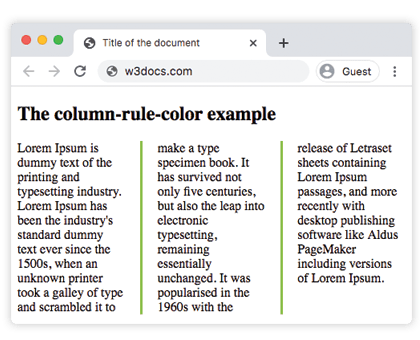
    <h1>The column-rule-color example</h1>
    <div>
      Lorem Ipsum is dummy text of the printing and typesetting industry. Lorem Ipsum has been the industry's standard dummy text ever since the 1500s, when an unknown printer took a galley of type and scrambled it to make a type specimen book. It has survived not only five centuries, but also the leap into electronic typesetting, remaining essentially unchanged. It was popularised in the 1960s with the release of Letraset sheets containing Lorem Ipsum passages, and more recently with desktop publishing software like Aldus PageMaker including versions of Lorem Ipsum.
    </div>
  </body>
</html>Resultado:
Valor RGB
Exemplo da propriedade CSS column-rule-color com valor RGB
<!DOCTYPE html>
<html>
  <head>
    <title>Title of the document</title>
    <style>
      div {
        column-count: 3;
        column-gap: 40px;
        column-rule-style: double;
        column-rule-color: rgb(234, 211, 21);
      }
    </style>
  </head>
  <body>
    <h1>The column-rule-color example</h1>
    <div>
      Lorem Ipsum is dummy text of the printing and typesetting industry. Lorem Ipsum has been the industry's standard dummy text ever since the 1500s, when an unknown printer took a galley of type and scrambled it to make a type specimen book. It has survived not only five centuries, but also the leap into electronic typesetting, remaining essentially unchanged. It was popularised in the 1960s with the release of Letraset sheets containing Lorem Ipsum passages, and more recently with desktop publishing software like Aldus PageMaker including versions of Lorem Ipsum.
    </div>
  </body>
</html>Valor HSL
Exemplo da propriedade CSS column-rule-color com valor HSL
<!DOCTYPE html>
<html>
  <head>
    <title>Title of the document</title>
    <style>
      div {
        column-count: 3;
        column-gap: 30px;
        column-rule-style: solid;
        column-rule-color: hsl(351, 97%, 57%);
      }
    </style>
  </head>
  <body>
    <h1>The column-rule-color example</h1>
    <div>
      Lorem Ipsum is dummy text of the printing and typesetting industry. Lorem Ipsum has been the industry's standard dummy text ever since the 1500s, when an unknown printer took a galley of type and scrambled it to make a type specimen book. It has survived not only five centuries, but also the leap into electronic typesetting, remaining essentially unchanged. It was popularised in the 1960s with the release of Letraset sheets containing Lorem Ipsum passages, and more recently with desktop publishing software like Aldus PageMaker including versions of Lorem Ipsum.
    </div>
  </body>
</html>Valores
| Valor | Descrição | Experimente |
|---|---|---|
| color | Define a cor da linha. Podem ser usados nomes de cores, códigos de cores hexadecimais, rgb(), rgba(), hsl(), hsla(). | |
| initial | Define a propriedade com seu valor padrão. | |
| inherit | Herda a propriedade do elemento pai. |
Propriedades relacionadas
A linha de coluna é controlada por três propriedades longas, geralmente combinadas com o atalho:
column-rule— atalho para definir estilo, largura e cor ao mesmo tempo.column-rule-style— o estilo da linha; obrigatório para que a linha (e sua cor) apareça.column-rule-width— a espessura da linha.
Veja também column-gap, que define o espaço em que a linha fica, e o atalho columns para construir o próprio layout de múltiplas colunas.